
| Requirement | Minimum version |
|---|---|
| Joomla | 4.4.0, 5.x or 6.x |
| PHP | 7.4 |
Migration steps
- On your Joomla 3 site, upgrade All Video Share to 3.6.1 first. This is required — earlier versions cannot be migrated directly.
- Update Joomla to the latest 3.10.x release. Joomla’s own migration tools are only available from 3.10.
- Migrate the site from Joomla 3.10.x to Joomla 4.x, 5.x or 6.x, following Joomla’s step-by-step migration guide.
- Install the current All Video Share 4.3.0 package on the migrated site. Install it over the top — do not uninstall the old version first. See the installation guide if you need the steps.
Never uninstall All Video Share as part of this process. Uninstalling drops the database tables and permanently deletes every video and category.
What the installer migrates for you
The first time you install version 4.x over Joomla 3 data, the installer automatically:
- Moves your old configuration and license details into the component’s Options, then removes the two legacy tables they lived in.
- Deletes the obsolete Joomla 3 component folders and files, including the old Flash player.
- Updates the video tables to the new category structure, preserving each video’s category assignments.
- Converts player settings from before version 4.1.0 into the current player options.
You do not need to re-enter your settings by hand. Do review them afterwards, as some options are new in 4.x.
Important upgrade notice
A few features behave differently in All Video Share 4.x. Please read these before you migrate.
If you use pre-roll or post-roll ads:
Video advertisements play on self-hosted, HLS and DASH videos only. They are not available on YouTube, Vimeo or third-party embedded videos, because those play inside the provider’s own player, which does not accept our ad tags. Both custom ads and VAST/VMAP ad tag URLs are supported on the video types listed above.
If you use comments:
Facebook, Komento and JLex comments are all supported in 4.x. Choose your integration under Options → Single Video Page → Comments. JComments is not supported.
If you use front-end video submission:
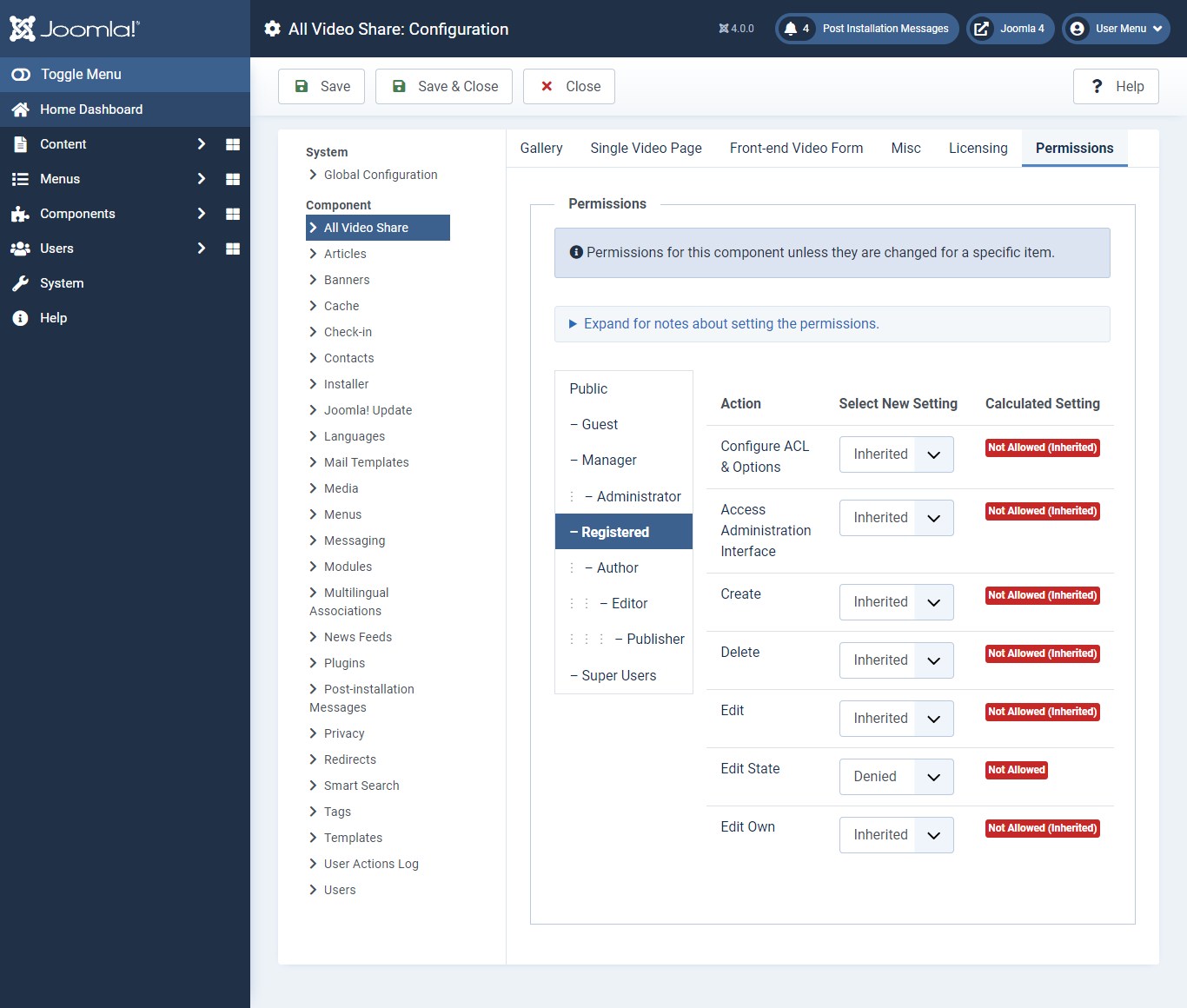
Permissions are now handled through standard Joomla user groups, so you can control who may create, edit and delete videos.
To configure them:
- Log in to your Joomla administrator.
- Go to Components → All Video Share → Videos.
- Click the Options button at the top right.
- Open the Permissions tab.
- Select a user group and set the permissions you want for it, then save.
To stop submitted videos from being published automatically, select the user group (for example Registered), set Edit State to Denied and save. Their videos then stay unpublished until an administrator approves them.
After migrating
Work through this checklist to confirm everything came across:
- Open Components → All Video Share and check your videos and categories are all listed.
- Review Options — confirm your migrated settings and set any new 4.x options you want.
- Re-check your license key under Options → Licensing so automatic updates keep working.
- Republish your All Video Share modules. Joomla’s migration can unpublish modules assigned to template positions that no longer exist.
- Visit a gallery page and play a video, to verify the player and your SEF URLs work.
- Check any articles containing
{avsplayer}tags. The tag syntax is unchanged, so they should render exactly as before.
Next steps
- Add your license key to enable automatic updates.
- Review the global configuration for options added in 4.x.
- Check your menu items still point at the right views.