
All Video Share installs four plugins. They let you place a player inside your articles, build a YouTube gallery from a tag, and include your videos in Joomla’s Smart Search results.
| Plugin | What it does |
|---|---|
| Content – Player – All Video Share | Replaces {avsplayer} tags in your content with a video player. |
| Content – YouTube – All Video Share | Replaces {avsyoutube} tags in your content with a YouTube gallery. |
| Button – YouTube – All Video Share | Adds an editor button that inserts an {avsyoutube} tag for you. |
| Smart Search – All Video Share | Adds your videos to Joomla’s Smart Search results. |
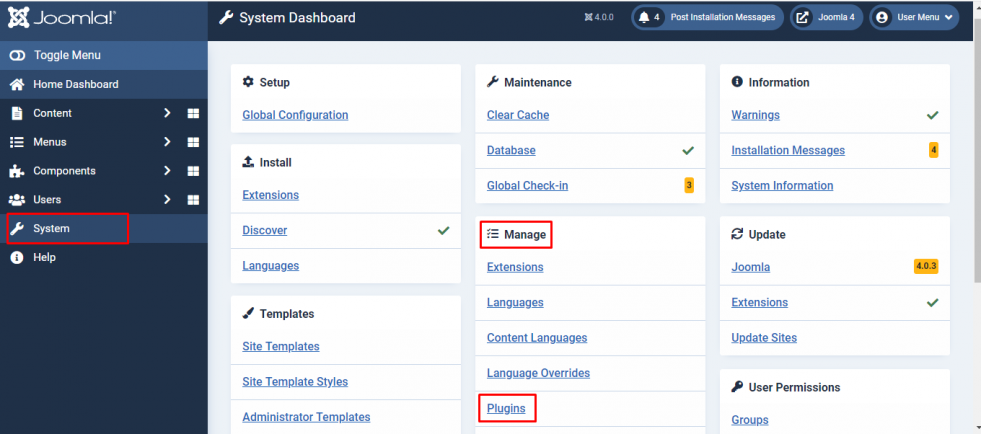
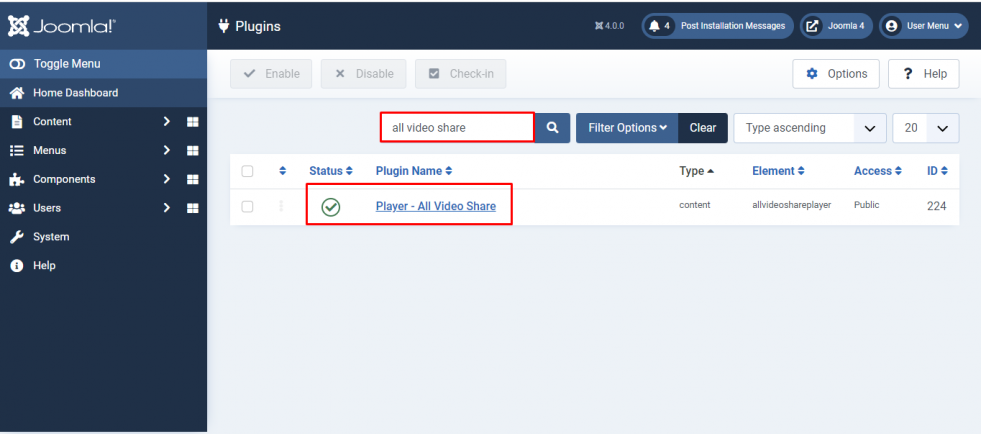
All four are enabled automatically when you install the package. If you need to check or change that, go to System –> Manage –> Plugins and search for allvideoshare.
Plugin Shortcodes
Easily embed video content inside your “Joomla articles”, “K2”, “Virtuemart”, “Kunena”, or any other Joomla component that supports “content” plugins. Use simple plugin tags like,
{avsplayer id=1}
{avsplayer src=https://www.youtube.com/watch?v=twYp6W6vt2U}
{avsplayer src=https://vimeo.com/108018156}
{avsplayer src=https://mysite.com/video.mp4}
{avsplayer src=https://mysite.com/playlist.m3u8}
{avsplayer src=https://mysite.com/stream.mpd}
Then using {avsplayer} syntax inside the content area of your article page will replace the syntax with the All Video Share Player.
Use id to play a video you have added to All Video Share, or src to play a video straight from a URL without adding it first. If you supply both, id wins and src is ignored.
Attribute values must not contain spaces. The tag is split on spaces, and any quotation marks are stripped out, so a value with a space in it will be cut short. Attributes you leave out follow your settings in Components → All Video Share → Options.
Choosing the video
| Properties | Description | Syntax |
|---|---|---|
| id | The ID of the video that should be played. You can get the video ID from Components -> All Video Share -> Videos in your Joomla back-end. | {avsplayer id=1} |
| src | Play a video directly from a URL, without adding it to All Video Share first. Accepts YouTube, Vimeo, MP4, HLS and MPEG-DASH addresses. Used only when no id is given. | {avsplayer src=https://mysite.com/video.mp4} |
| image | A poster image to show before playback. Used with src. | {avsplayer src=https://mysite.com/video.mp4 image=https://mysite.com/poster.jpg} |
| autodetect | Play whichever video the visitor is currently viewing, instead of a fixed one. Useful in a template override or a repeated block. | {avsplayer autodetect=1} |
| width | Maximum width of the player, in pixels. Leave it out to fill the available space. | {avsplayer id=1 width=640} |
| ratio | Player height as a percentage of its width. 56.25 gives a 16:9 player. | {avsplayer id=1 ratio=56.25} |
Playback
| Properties | Description | Syntax |
|---|---|---|
| autoplay | Enable or disable autoplay. Most browsers only allow this when the player is also muted. | {avsplayer id=1 autoplay=1} |
| loop | Enable or disable playing the video repeatedly. | {avsplayer id=1 loop=1} |
| muted | Mute or unmute the video. | {avsplayer id=1 muted=1} |
| volume | The starting volume level, from 0 to 100. This is not a show/hide switch — use volumectrl for the button. | {avsplayer id=1 volume=50} |
Controls
Each of these takes 1 to show the control or 0 to hide it.
| Properties | Description | Syntax |
|---|---|---|
| controlbar | The whole control bar. | {avsplayer id=1 controlbar=0} |
| playlarge | The large play button in the middle of the video. | {avsplayer id=1 playlarge=0} |
| play | The play and pause button. | {avsplayer id=1 play=1} |
| rewind | The skip backward button. | {avsplayer id=1 rewind=1} |
| fastforward | The skip forward button. | {avsplayer id=1 fastforward=1} |
| progress | The seek bar. | {avsplayer id=1 progress=0} |
| currenttime | The elapsed time. | {avsplayer id=1 currenttime=0} |
| duration | The total length of the video. | {avsplayer id=1 duration=1} |
| volumectrl | The mute button and volume slider. | {avsplayer id=1 volumectrl=0} |
| captions | The subtitle button. | {avsplayer id=1 captions=1} |
| quality | The quality switcher. | {avsplayer id=1 quality=1} |
| speed | The playback speed menu. | {avsplayer id=1 speed=1} |
| pip | The picture-in-picture button. | {avsplayer id=1 pip=1} |
| download | The download button. | {avsplayer id=1 download=1} |
| fullscreen | The fullscreen button. | {avsplayer id=1 fullscreen=0} |
| embed | The embed button. | {avsplayer id=1 embed=0} |
| share | The share buttons. | {avsplayer id=1 share=1} |
Advertisements
| Properties | Description | Syntax |
|---|---|---|
| adsource preroll postroll | Use your own advertisement videos. adsource must be the word custom. | {avsplayer id=1 adsource=custom preroll=1 postroll=0} |
| adsource adtagurl | Use an external ad server. adsource must be the word vast, and the ad tag URL must contain no spaces. | {avsplayer id=1 adsource=vast adtagurl=YOUR_VAST_URL} |
Advertisements play on self-hosted, HTTP streaming and external URL videos only — not on YouTube or Vimeo videos.
YouTube Plugin
The YouTube content plugin works the same way, using the {avsyoutube} tag. It builds a gallery from a YouTube playlist, channel, username, search term, live stream or your own list of YouTube URLs.
{avsyoutube source=playlist id=PLxxxxxxxxxxxxxxxx}
{avsyoutube source=channel id=UCxxxxxxxxxxxxxxxx}
Rather than writing the tag by hand, use the All Video Share YouTube button below your editor — it builds the tag for you from the options you choose.
This plugin needs a YouTube API key, set under Options → API Keys. See How to Get a YouTube API Key and Embedding a YouTube Channel / Playlist.
Smart Search Plugin
This plugin adds your videos to Joomla’s Smart Search results, so visitors can find them from your site’s main search rather than only from the All Video Share search box.
After enabling it, go to Components → Smart Search → Index and click Index to add your existing videos. Videos you add afterwards are indexed automatically as you save them.