
This is the time to deploy your back-end content on the front end. All Video Share is capable of producing its output as a Module, a Plugin, or the Component (Menu Item) itself. Here we speak about adding the component as a Menu Item.
To add a new Menu Item:
1. Log in to the Joomla! backend.
2. Select Menus → Main Menu → New
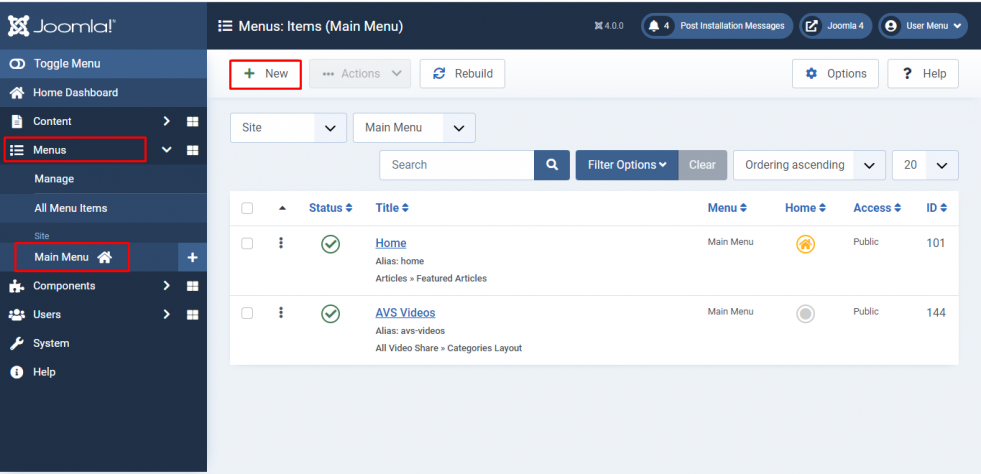
3. Next to Menu Item Type, click Select, then choose All Video Share. We currently have five layout types.
| Layout | What it displays |
|---|---|
| Categories Layout | All of your video categories, or only the videos from one selected category. |
| Videos Layout | All of your videos, or only one selected video. |
| YouTube Gallery | Videos fetched live from a YouTube playlist, channel, username, search term or a custom list of URLs. |
| Manage Videos | A page where logged-in users can add, edit and delete their own videos. |
| Add New Video | The form for logged-in users to submit a video. |
Here in the example, we go with Categories Layout.
4. After the selection, you will see that All Video Share adds its own configurable options (parameters) to the menu item form, grouped under All Video Share.
For the Categories Layout, the Select Category field decides what the page does:
- Leave it empty — the page displays all of your created categories in a gallery view. Clicking a category opens the videos inside it.
- Choose a category — the page goes straight to the videos in that one category.
Here is the example for Display All Categories, so we leave Select Category empty.
The Videos Layout works the same way with its Video field: leave it empty to list all of your videos, or choose one video to make the menu item a direct link to that video’s page.
The available parameters
The Categories Layout groups its settings into four sections. The Videos Layout offers the same settings, with the category options left out.
| Section | What you can set |
|---|---|
| General | Number of Rows, Number of Columns, Short Description and RSS Feed. |
| Categories Layout | How the categories are sorted (Order By), and whether to show the Videos Count on each one. |
| Videos Layout | How the videos are sorted, Featured Only, and whether to show the Category Name, Author Name, Date Added, Views Count, Ratings and Open Videos in Popup. |
| Player | Player Width and Height, Autoplay, Loop, Initial Volume Level, Muted, every control bar button, and the advertisement settings. |
Most of these settings offer a Use Global choice. Leaving a setting on Use Global means it follows whatever you have set in Components → All Video Share → Options. Change it here only when you want this one page to behave differently from the rest of your site.
5. Then, the final step is to fill up the Menu Item Details and save the form.
6. Congrats! You have successfully added an All Video Share Menu Item.